
Microsoft 365 should make your business smoother, quicker and easier to manage. But if you run a manufacturing, engineering, fabrication or construction business, you already know this truth:
When Microsoft 365 isn’t set up or supported properly, it becomes a daily frustration.
Slow syncing. Missing files. Permissions that don’t make sense. Outlook causing chaos. Teams crashing at the worst times.
The problem isn’t Microsoft 365.
The problem is that most small businesses never get Microsoft 365 configured the way it was designed to be used.
In this guide, we explain:
- The most common Microsoft 365 problems North West SMEs face
- Why they happen
- How proper support fixes them
- How Microsoft 365 should run in a busy industrial environment
- The tools your IT partner should use
If Microsoft 365 feels harder than it should, this will help you understand why.
Symptoms of Poor Microsoft 365 Support
If any of these feel familiar, you’re probably working around problems you shouldn’t have.
Outlook running slow or freezing
Your team reports:
- Emails taking ages
- Calendar not updating
- Search not working
- Outlook randomly restarting
These are classic signs of poor profile management, outdated authentication, or too much cached data.
OneDrive or SharePoint constantly stuck syncing
A major productivity killer.
You get:
- Files stuck on “sync pending”
- Duplicate folders
- “Someone else is editing this file”
- Documents that don’t match between workers
This is the number one complaint we see in engineering and construction businesses.
Teams crashing or freezing during meetings
Symptoms include:
- Dropped calls
- Camera failing
- Files not loading
- Teams taking ages to open
When Teams isn’t configured correctly, it drags the whole device down.
Permissions and shared access never quite right
Staff asking:
- “Why can’t I open this folder?”
- “Why is that job file missing?”
- “Why can Bob see everything but I can’t?”
If your file access isn’t structured, your business loses time every day.
Microsoft 365 licences all over the place
You might be paying for seats you don’t use, missing backups or using the wrong plan entirely.
This hits small businesses with 5 to 70 staff often.
Files saved in the wrong place
When Microsoft 365 isn’t configured with clear rules, data ends up in:
- People’s desktops
- Personal OneDrive accounts
- Random shared folders
- Email attachments
- USB drives
This is how data loss happens.
If any of this sounds familiar, a quick Microsoft 365 Health Check will pinpoint exactly where the problems are coming from and provide guidance on how to resolve them properly.
There is no obligation. Just clarity.
Why Microsoft 365 Problems Hit Industrial SMEs the Hardest
If you run a factory, fabrication workshop, engineering office or construction company, you rely on:
- Drawings
- Job sheets
- Quotes
- Supply chain documents
- Photos
- Shared folders
- Daily communication
Microsoft 365 is the heart of that workflow.
When syncing stops, your operations slow down.
When permissions break, jobs get delayed.
When Outlook crashes, communication falls apart.
When Teams fails, field staff can’t report issues.
Industrial SMEs feel Microsoft 365 failures more than office businesses because your work is time sensitive, production driven and reliant on accurate documents.
This is exactly why you need Microsoft 365 set up properly from day one.
What Good Microsoft 365 Support Looks Like
What most IT providers miss is how these things are put in place.
At Focus, we do not tweak Microsoft 365 until it stops breaking. We fix it properly.
Every new Microsoft 365 engagement starts with our Safe Launch process. We take time to understand how your business actually works, how files are used day to day, and where things are currently breaking.
During Safe Launch, we identify existing issues, document them clearly, and produce proper recommendations. That means no guesswork, no ad hoc changes, and no half fixes. Everything is planned, explained, and implemented in the right order so Microsoft 365 stays stable long term.
Here is what your IT partner should be doing as standard.
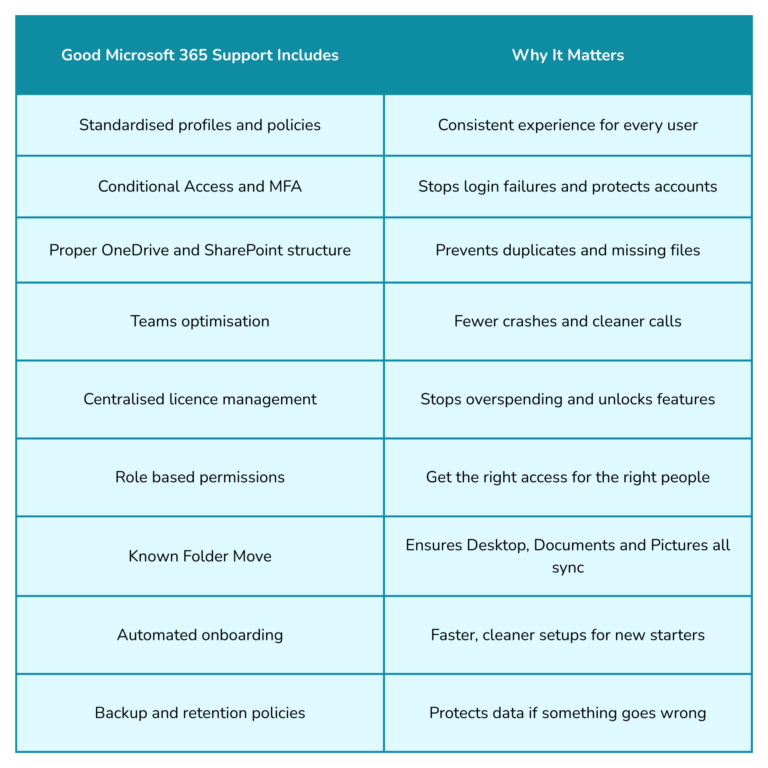
This is how we support manufacturing, engineering and construction businesses across Skelmersdale, Wigan and Liverpool every day. We work hands on with local teams, fixing problems at the root rather than masking symptoms.
How Microsoft 365 Should Be Set Up in a Small Business
This is how to get the best performance, speed and reliability.
A clean, structured SharePoint setup
Your business should have:
- Department folders
- Job folders
- Project folders
- Controlled access
- Version history
- Limited personal storage
This prevents chaos.
OneDrive configured correctly
Your staff shouldn’t store work in random places.
OneDrive should:
- Sync automatically
- Back up Desktop and Documents
- Update instantly
- Avoid duplicate conflicts
Teams configured for communication, not storage
Teams should be for:
- Messaging
- Meetings
- Quick file access
- Announcements
Not long term file storage.
SharePoint should handle that.
Outlook set up with modern authentication
This solves 90 percent of Outlook issues.
No more:
- Password loops
- Login failures
- Slow syncing
- Corrupted profiles
Permissions based on department or role
A Production Manager should not need the same access as Finance.
Clear policies prevent cross department confusion.
Training so staff know where to save files
Even a simple 20 minute session transforms a team.
Microsoft 365 Security: What Every Small Business Needs
Small businesses are targeted more than ever.
Microsoft 365 security must include:
- MFA
- Conditional Access
- Device compliance rules
- Data Loss Prevention
- Encryption
- Backup and retention
- Secure file sharing rules
- External sharing controls
Is Your Microsoft 365 Setup Helping or Holding You Back? Quick Test
Answer these:
- Do staff complain that “Outlook keeps breaking”?
- Do Teams meetings freeze?
- Do you have missing or duplicated files?
- Do different staff see different versions of the same document?
- Do you keep having to reset OneDrive?
- Do you get random permission errors?
- Does your IT company struggle to explain anything?
If you said yes to more than two, your Microsoft 365 needs work.
Is Your Microsoft 365 Setup Helping or Holding You Back? Quick Test
If you want Microsoft 365 that feels simple, stable and stress free, we can help.
We support small businesses across Skelmersdale, Wigan, Liverpool and the wider North West with Microsoft 365 that just works.
Book a free Microsoft 365 Health Check
We’ll show you what’s working, what isn’t and where you can improve.
FAQ: Microsoft 365 Support for Small Businesses
1. What is a Microsoft 365 health check?
A Microsoft 365 health check is a simple review of how Outlook, OneDrive, SharePoint and Teams are configured across your business. It highlights slowdowns, syncing issues, security gaps, permission mistakes and hidden bottlenecks that staff deal with every day.
2. Why does Microsoft 365 run slowly for my team?
Slow performance usually comes from:
- Old Outlook profiles
- OneDrive not configured correctly
- Unstructured SharePoint folders
- Devices using outdated Office apps
- Incorrect Teams cache or settings
- Identity or licence conflicts
These issues are common when Microsoft 365 has grown without proper structure.
3. Why do we get duplicate files in OneDrive or SharePoint?
Duplicates are caused by users saving files in different places.
Typical causes include:
- No Known Folder Move
- Personal OneDrive accounts being used for work
- Staff storing job files on desktops
- Unstructured SharePoint sites
- Incorrect syncing setup
When your file structure is cleaned up, duplicates stop instantly.
4. Why do some staff see different versions of the same file?
This usually happens when files are:
- Saved in the wrong location
- Synced locally instead of through SharePoint
- Stored in personal OneDrive accounts
- Edited while offline without proper sync rules
A standardised SharePoint structure fixes this across the business.
5. Why does Outlook freeze or crash?
The most common reasons are:
- Old authentication methods
- Large OST files
- Cached data that hasn’t been cleared
- Duplicate or corrupted profiles
- Outdated Office apps
A clean profile and proper identity configuration solves most Outlook issues permanently.
6. Why does Teams crash during meetings?
Teams issues usually come from:
- Outdated Teams client
- Corrupted cache
- Poor configuration
- Incorrect device policies
Teams should feel fast and stable. If it doesn’t, your environment needs tuning.
7. Do you support Microsoft 365 for businesses in Skelmersdale, Wigan and Liverpool?
Yes. We support manufacturing, engineering, fabrication and construction SMEs across:
- Skelmersdale
- Wigan
- Liverpool
- St Helens
- Warrington
- Southport
- Wider Lancashire, Merseyside and Cheshire
8. Can you fix our existing Microsoft 365 setup without downtime?
Yes.
We fix 365 structures while your team keeps working.
Our Safe Launch process ensures:
- No data loss
- No downtime
- No disruption
- No surprises
Most businesses see improvements within the first 48 hours.
9. Can you help with permissions and access problems?
Absolutely.
We rebuild your Microsoft 365 permissions into a clear, role based model so the right people have the right access every time.
10. We already have IT support. Can you just fix Microsoft 365?
Yes.
A lot of SMEs come to us specifically for Microsoft 365 support because their current provider struggles with:
- SharePoint
- OneDrive
- Outlook
- Teams
- Permissions
- Licences
- File structures
We can support your Microsoft 365 setup even if another company handles general IT.
Most businesses come to us after years of Microsoft 365 being “patched” instead of fixed. That is exactly what our Safe Launch process is designed to undo.