
If your team works on MacBooks, you’ll already know this feeling.
Something breaks.
You call IT.
There is a pause. Then the dreaded line…
“Yeah… we don’t really do Apple.”
And that’s the moment everything slows down.
The truth is simple: most IT providers were built around Windows only environments.
Macs were treated like the creative team toy, and because of that, many MSPs still do not support macOS properly even today.
At Focus Technology Solutions, we support MacBooks confidently, quickly and properly. No half knowledge. No Googling fixes. No awkward workarounds. Just straight-talking, people-first IT support that keeps your team productive.
This guide breaks down:
- why Mac support is a problem for many IT providers
- symptoms that show you’re with the wrong partner
- common MSP mistakes with macOS
- what good Mac support actually looks like
- the tools your provider must use
- a local case study
- how Macs work with Google Workspace and Microsoft 365
- when it’s time to switch
- our 101 Day Smile Guarantee and Safe Launch
Whether you’re in Skelmersdale, Wigan, Liverpool, Merseyside or anywhere in the North West, if your business uses MacBooks, this could save you a lot of stress.
Why Some IT Companies Still Struggle With Macs
Most IT companies were built during a time when Windows dominated office life. Their tools, processes and training were all centred around Microsoft.
That leads to problems like:
- engineers searching Google for basic macOS fixes
- Windows-first security tools that “sort of” work on Mac
- onboarding that takes too long
- mismatched settings
- poor device management
- advice that pushes you back to Windows
None of this is acceptable today, especially when MacBooks are now standard in creative, leadership, sales and hybrid teams.
Symptoms You’re Using Macs With The Wrong IT Provider
If your IT company does not truly support Macs, it shows up in frustrating, repeatable symptoms.
Connectivity symptoms
- Mac constantly drops Wi-Fi
- Mac can’t access shared drives reliably
- Mac needs a VPN for everything
- Microsoft 365 is slow on Mac
- Mac takes ages to authenticate on Wi-Fi networks
Cloud storage symptoms
- OneDrive sync errors on macOS
- Google Drive for Desktop keeps disconnecting
- SharePoint loads slowly on Mac
- File permissions behave differently on Mac
Security symptoms
- macOS updates are delayed
- Antivirus doesn’t fully support macOS
- Device monitoring doesn’t work consistently
- Encryption isn’t applied correctly
User experience symptoms
- New starters take ages to set up
- Apps need installing manually
- Configurations are inconsistent
- Printers behave differently on Macs
If you’re experiencing one or more of these, your provider is using Windows-first tools.
Common Mistakes MSPs Make With Mac Support
Here are the mistakes we see most often when we take over from other providers.
Using Windows-first tools on macOS
This leads to:
- patching failures
- incorrect security policies
- unreliable monitoring
- broken updates
No macOS training for engineers
If your IT team doesn’t know:
- macOS preferences
- Apple MDM
- Apple Business Manager
- zero touch deployment
- Mac security frameworks
…then they’re guessing.
Treating Macs as exceptions, not primary devices
This makes onboarding slow and inconsistent.
Overcomplicating mixed environments
Many businesses use:
- Macs
- Windows
- Google Workspace
- Microsoft 365
Your IT company must understand all four, not just one.
Pushing users back to Windows
This is usually because the MSP is more comfortable on Windows, not because it benefits your team.
What Proper Mac Support Should Actually Look Like
Supporting Macs isn’t complicated when you know what you’re doing.
Fast, confident troubleshooting
Engineers who understand:
- macOS settings
- hardware quirks
- application issues
- Apple Silicon differences
Zero touch onboarding
A new starter opens their MacBook, logs in and everything appears:
- applications
- settings
- Wi-Fi
- permissions
- security policies
Zero manual installs. Zero faff.
Real macOS security
Apple-specific tooling that handles:
- patching
- encryption
- monitoring
- threat detection
- compliance
Not “Windows tools that might work on Macs”.
Apple-friendly device management
Using platforms built for macOS:
- automated enrolment
- app deployments
- configuration profiles
- remote support
- consistent settings
Backup and recovery that actually works on macOS
Your data must remain:
- safe
- recoverable
- protected
- encrypted
This should work seamlessly across Teams, SharePoint, Google Drive or hybrid setups.
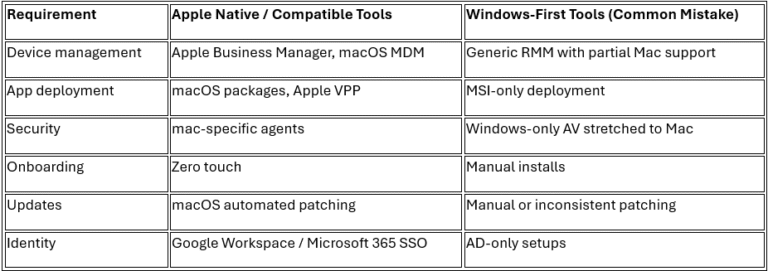
The Mac Support Tech Stack: What a Good Provider Uses
Here’s a simple comparison.
How Fixing One Simple Issue Transformed a Liverpool Team
A digital design agency in Liverpool came to us with a simple complaint:
“Our Macs take ages to sync Google Drive. Files disappear. Sharing is slow. Nothing feels stable.”
Their previous IT provider didn’t use any Mac-native management tools, so every device behaved differently.
What we found:
- Google Drive for Desktop wasn’t configured correctly
- macOS updates weren’t applied
- security agents were crashing
- onboarding was entirely manual
- no Apple Business Manager in place
What we did:
- enrolled devices into proper macOS management
- rebuilt Google Drive configuration
- automated app deployment
- moved onboarding to zero touch
- applied consistent security policies
Result:
- sync speeds improved dramatically
- onboarding time dropped by 75 percent
- the team went from frustrated to delighted
This is what proper Mac support does.
Macs, Google Workspace and Mixed Environments
A lot of businesses that choose Macs also choose Google Workspace.
And the good news is simple:
- Google Workspace works brilliantly on macOS
- Microsoft 365 works brilliantly on macOS
The only problems appear when your IT provider doesn’t understand mixed environments.
According to Google, Workspace is fully compatible with macOS when configured correctly
What Good Mac Support Includes
Use this to see how your current IT provider measures up.
Your provider should offer:
- zero touch deployment
- Apple Business Manager
- proper macOS security
- Google Workspace and Microsoft 365 support
- consistent configurations
- fast, confident macOS troubleshooting
- monitoring that actually works on Mac
- real backup and recovery
- support for mixed Windows and Mac environments
If you can’t tick most of these, it’s time to change something.
When It’s Time to Switch IT Support
It’s time to switch if:
- Mac issues keep repeating
- onboarding is a headache
- your tools don’t talk to each other
- security is unclear
- your IT company sounds unsure
- fixes are slow
- your team feels frustrated
Switching doesn’t have to be stressful.
That’s why we designed Safe Launch, our structured migration process that makes switching smooth and predictable.
And if you’re unsure?
Our 101 Day Smile Guarantee removes the risk.
If you’re not genuinely happy, you don’t pay.
Serving Mac Users Across the North West
We support Mac-based businesses in:
- Skelmersdale
- Wigan
- Liverpool
- Across the North West
Office based, remote, hybrid or mixed environments.
If you use Macs in your business, you deserve support that matches your work style.
MacBook IT Support FAQ
Do IT companies support MacBooks properly?
Some do, many don’t. We support MacBooks fully with Apple-native tools and real macOS expertise.
Is supporting Macs harder for business IT?
Only if the provider lacks experience. With the right setup, Macs are simple and secure.
Can Macs and Windows devices be supported together?
Yes. We support mixed environments every day.
Do you support Google Workspace on Macs?
Absolutely. We support Microsoft 365 and Google Workspace on macOS.
Ready for stress-free Mac support?
If you want your Macs to run the way Apple intended, we’re here to help.
Friendly. Local. Fast. Stress free.
That’s Focus.