
This month, we’ve been out in the community, in the cloud, and everywhere in between.
A summer of sport, a client shoutout worth sharing, and some genuinely useful updates from Microsoft.
Here’s what’s in this month’s update:
- Where are your files really going? A plain-English guide to cloud storage options
- AI risks your team might not even know they’re taking
- What’s new in Microsoft Teams and Windows 11
- A client experience that says it better than we ever could
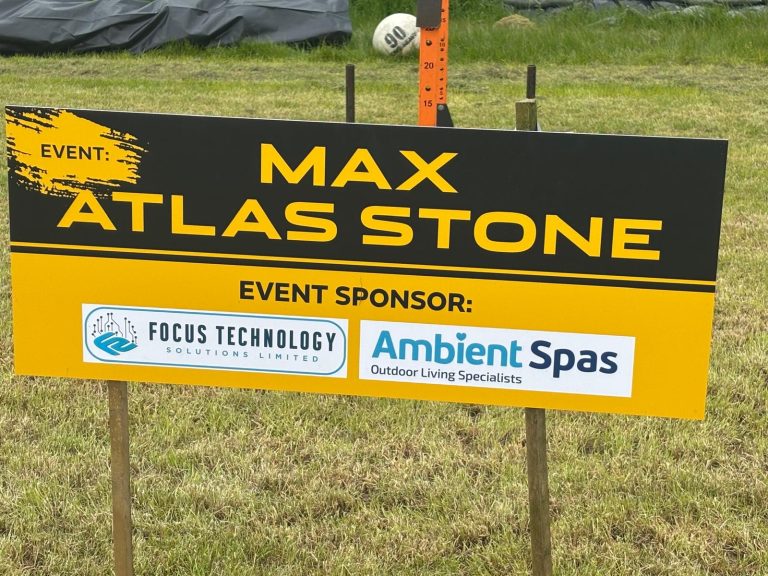
- Focus out in the community, sponsoring the North West Strength Classic
- Quick IT tips and a few FAQs
Contents:
Where are your files really going?
When businesses talk about moving to the cloud, it can sound like one simple decision.
But there are actually a few different routes. And the right one depends entirely on how your business works.
At its simplest, cloud storage means your files and data are no longer sitting on a single computer or server in your office. Instead, they live in secure data centres and are accessed over the internet.
That’s what lets your team open files from anywhere, share instantly, and work together in real time.
But not all cloud setups are the same.
The most common option: Public cloud
This is where your data is stored on shared infrastructure managed by a provider. Microsoft 365, OneDrive, and SharePoint all fall into this category. You’re effectively renting space in a highly secure, always-available environment, without needing to maintain any hardware yourself.
More control: Private cloud
A private cloud gives your business dedicated infrastructure, either hosted on-site or in a data centre. It offers more control and can be useful if you handle sensitive data with specific compliance requirements. The trade-off is more responsibility and usually higher cost.
The middle ground: Hybrid
Some businesses use a bit of both. Everyday files and collaboration tools in the public cloud, while more sensitive systems or data stay in a private environment. It gives you flexibility to balance accessibility, control, and risk.
Whatever you choose, the benefits tend to be consistent:
- Your team can access what they need from anywhere
- Storage scales up or down without buying new equipment
- Your data is protected by multiple backups across different locations
- You’re not relying on a single device or office server that could fail
The important thing is that the cloud isn’t one-size-fits-all. The way it’s set up should reflect how your business actually operates.
If you’re not sure whether your current setup is right, or you’d just like a clearer picture of your options, we’re happy to have a straightforward conversation. Get in touch.
Everyone's talking about AI. But what are the risks?
There’s a lot of pressure on businesses right now to be using AI.
And in many cases, the tools genuinely do help. They save time, reduce repetitive work, and free people up for the things that actually need their attention.
But behind the enthusiasm, there’s a conversation that not enough businesses are having.
“What could go wrong?”
Most businesses already know there are risks. But many are moving ahead anyway, often because they feel they can’t afford to fall behind.
That creates a problem.
The issue with AI access
If an AI tool has access to your systems, it also has access to your data. Without the right controls in place, there’s a real risk of sensitive information being shared outside the business, sometimes without anyone realising.
AI tools can also be tricked. A cleverly written prompt or unusual link could cause an AI assistant to behave in ways you didn’t ask for or expect.
Shadow AI is becoming more common
In many businesses, different teams are experimenting with different AI tools. Some are approved. Others aren’t.
This is shadow AI. And it’s not about bad intentions. People just want to get things done. But over time, it becomes harder to track what’s being used, what data is being shared, and where it’s going.
What good AI use looks like
The businesses getting real value from AI aren’t the ones who’ve jumped in fastest. They’re the ones who’ve done it with structure.
- Approved tools only, with clear guidance for staff
- Someone responsible for overseeing how AI is used
- Regular check-ins on what’s being used and why
- A clear policy on what data can and can’t be shared with AI tools
AI isn’t going away. But using it well means using it carefully. If you’d like to talk through how to approach this safely for your business, we can help.
DID YOU KNOW...
Staying connected is still the smart move
Microsoft engineers are reportedly exploring ways to make it easier to set up a Windows PC without needing a Microsoft account. Nothing is confirmed yet, but it’s a sign the setup experience is continuing to evolve.
That said, using a Microsoft account still unlocks the full benefits of Windows 11, including seamless access to Microsoft 365, OneDrive, and built-in security features. For businesses especially, staying connected is still the approach that works best.
New to Microsoft
Two updates worth knowing about
1
Your Windows 11 taskbar is getting more flexible
Microsoft has confirmed that you’ll soon be able to move your taskbar again, placing it at the top or sides of your screen rather than being locked to the bottom. You’ll also be able to adjust its size.
It might sound like a minor thing, but it’s one of the most requested changes in years. It reflects a shift in Microsoft’s approach, focusing more on usability and everyday experience rather than just adding new features.
2
Joining a Teams meeting is about to get less frustrating
Microsoft is phasing out those familiar CAPTCHA checks, the ‘prove you’re not a robot’ tests, when joining Teams meetings. They’re being replaced with a smarter system that detects bots automatically in the background.
Instead of making every person jump through hoops before a call, the system flags anything suspicious and lets the meeting organiser decide what to allow.
Less friction for your team. Better control behind the scenes. That’s a win.
Quick IT Tip: Keyboard Shortcuts You’ll Actually Use
A few that quietly save time throughout the week.
Windows
- Windows + Shift + S — Quick screen snip. Select exactly what you want without opening the Snipping Tool.
- Ctrl + Backspace — Delete whole words at a time rather than individual letters.
- Windows + V — Open your clipboard history and paste something you copied earlier. Enable it once in settings, then it’s always there.
Mac
- Command + Option + D — Show or hide the Dock for more screen space.
- Command + Control + Q — Lock your Mac immediately when stepping away from your desk.
- Command + Shift + 4 — Take a screenshot of a selected area of your screen.
Small habits. Big difference over a week.
Technology Update
Microsoft Copilot is reminding people to take breaks
If you’ve been using Microsoft Copilot for a long stretch, you might notice something slightly unexpected. A small message appears in the chat window suggesting it might be time for a break, with a gentle reminder that Copilot is an AI, but you’re not.
It’s not a restriction or a warning. Just a nudge.
As AI becomes part of the daily workflow for more teams, it’s interesting to see the tools themselves starting to encourage healthier habits. A small thing, but worth noting.
What’s Been Happening at Focus
This is what good support looks like
We don’t share feedback to show off. We share it because it’s a reminder of what we’re here for.
This month, one of our clients left this after a support call with Ryan:
Phone quickly answered. Issue resolved so I can carry on with my work 🙂 Thanks Ryan”
A quick response. A resolved problem. Someone getting back to work without the stress.
That’s the whole point.
It’s not flashy. It doesn’t involve complex systems or impressive jargon. It’s just a person who needed help, got it quickly, and could get on with their day.
Well done, Ryan. That’s exactly what we’re about.
We sponsored the North West Strength Classic
This month we were proud to sponsor the Max Atlas Stone event at the North West Strength Classic.
Alongside Ambient Spas, our logo was on the boards at a fantastic event that brought together competitors and supporters from across the region.
Strength competitions like this are a great reminder of something we think about a lot in business too. Consistency, preparation, and showing up when it matters.
We love being part of the local community beyond just the office. Whether that’s sponsoring events, attending business fairs, or just being visible and connected to the people and places around us.
Thanks to everyone involved in putting on such a well-run event. It was a brilliant day.
FAQs
What is the difference between public and private cloud?
Public cloud means your data is stored on shared infrastructure managed by a provider like Microsoft. Private cloud means the infrastructure is dedicated to your business. Most SMEs start with public cloud and only look at private when they have specific compliance needs.
Is shadow AI a real risk for small businesses?
Yes. If staff are using unapproved AI tools to get things done, sensitive data can end up outside your control without anyone realising. The fix isn’t to lock everything down. It’s to provide the right tools with clear guidance.
Should my business be using AI yet?
Yes, but in a controlled way. Start with trusted, approved tools and set clear expectations around data use. Letting everyone experiment freely creates risk. Guiding it properly creates value.
What is the biggest security risk for small businesses?
Usually people, not technology. Weak passwords, phishing emails, and poor access control cause most issues. Simple habits, consistently followed, make a bigger difference than any individual tool.